Dropshare 4.7.0 MacOSX
This post was published 8 years ago. Download links are most likely obsolete. If that's the case, try asking the uploader to re-upload.
Compatibility: OS X 10.9 or later, 64-bit processor | File size: 11.5 MB
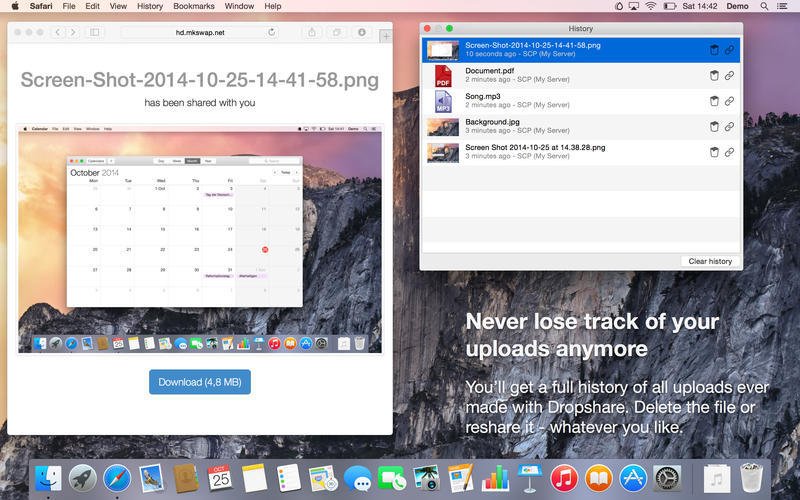
Your very own secure file sharing tool! Dropshare is a menu bar application for Drag&Drop upload files, screenshots and even directories to your own server, Amazon S3 or Rackspace Cloud Files. Sharing files with friends, customers, colleagues or anyone else has never been so professional!
Dropshare supports SCP over SSH, a secure industry standard protocol for file transfers. Uploads to Amazon Simple Storage Service (S3) or Rackspace Cloud Files are also supported, which both are low-priced file hosting services in the cloud. Compared to other cloud hosted file sharing services, Dropshare directly connects to your very own Amazon S3 bucket or Rackspace Cloud Files container, so there is no third-party involved at all.
Dropshare supports Multiple Connections: You can set up different upload destinations at the same time and switch between them using user-defined keyboard shortcuts!
Uploads everything
No matter if files, folders, text or screenshots - Dropshare uploads every file and data to your selected destination - also from clipboard or other applications like Safari. Share Extension included!
Share and annotate screenshots!
Set up your own keyboard shortcuts for fullscreen or selection-based screenshots that'll be uploaded automatically with Dropshare. Set up a custom keyboard shortcut for taking a screenshot and annotating it afterwards with an app you like: Preview.app, Skitch.app or Napkin.app!
Screen Recordings
Take & upload Screen Recordings directly with Dropshare, both fullscreen and selection-based recordings are available, as well as GIF conversion!
Dropshare Safe
Easily create access-restricted URLs for your uploads with either a lifetime and/or password.
Beautiful individual landing pages
Choose from a number of free designs or craft an individual design on your own using HTML, CSS and javascript. A preview can be embedded for several file types, e.g. images, text or video files.
Choose your URL shortener
Dropshare supports URL shorteners as well - natively supported URLs (e.g. dsh.re), or configure your very own URL shortener service like bit.ly (for hosted services) or YOURLS (for self-hosted services).
Dropshare Sync
Synchronize your upload history across all your devices which have Dropshare installed.
1-Click Delete from your server
Whenever you decide that you no longer want to share a specific file, just use Dropshare to delete it from the upload destination again.
Markdown to HTML
If enabled, Dropshare automatically converts Markdown files to HTML.What's New
Version 4.7
New
-Screenshot Annotations Beta - Starting with this update, Dropshare will natively support screenshot annotations without switching to a third-party app. With the Dropshare Annotation Tool, you’re able to quickly add text, geometrical forms and blurs to your screenshots, as well as crop them to your desired size.
-Dropshare Safe is now integrated - Our powerful access-restricting service Dropshare Safe is now directly integrated into the app. While that makes creating access-restricted URLs even easier than before, it also enables Dropshare to remember previously created URLs which now can be retrieved from the context menu at any time.
-Access statistics right from the popover menu - When using Dropshare Cloud, the access statistics for your uploads will now be displayed right in the popover menu. Now you’re able to see at a glance which of your most recent uploads are accessed the most.
-Support for Microsoft Azure Blob Storage - Happy to announce that with this update, Dropshare is supporting yet another storage provider: Microsoft Azure Blob Storage. It is a fully-featured supported provider, meaning that also landing pages are supported. Check out our User Guide to learn how to configure set up a Blob Storage connection.
-Support for DigitalOcean Spaces - Worth to mention, DigitalOcean launched Spaces a few weeks ago. As their API is compliant with Amazon S3, it just works out of the box with Dropshare. In our User Guide we’ve compiled a short article with information on how to set up a Spaces connection.
Improved
-Share Extension - The Share Extension has been further improved: It is now possible to share multiple files (and folders!) and once, which will be compressed to a single ZIP file.
-Screen Recordings - The Screen Recording feature has been updated: Now it automatically is in Record from Selection when started, because we think that is what most of you do. To switch back to Fullscreen Recording, just click anywhere on screen. Also, showing mouse clicks in recordings does now work again.
Homepage
Quick check before we show the links
Helps us keep automated scrapers from hammering the filehosts.