Nomad.NET Portable 2.8.7.1740 Stable / 3.2.0.2745 Latest
This post was published 10 years ago. Download links are most likely obsolete. If that's the case, try asking the uploader to re-upload.
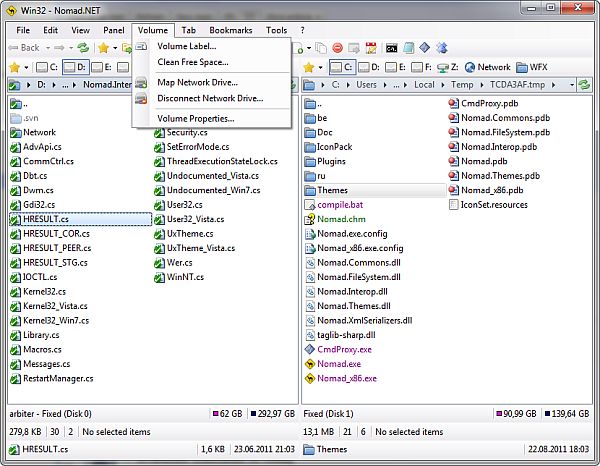
Nomad.NET Portable 2.8.7.1740 Stable / 3.2.0.2745 Latest | 10.8 Mb
Nomad.NET is the successor of Nomad, a powerful file manager written a couple of years ago. It is completely rewritten using best ideas and algorithms and implementing everything in a completely new way. It has almost all features required by modern file manages and several unique ones. All this features packed with easy and clean UI.
Features
• One of the most powerful search engines on market (if I can say market, project is freeware). You can create very complex search rules, with ability to search in different encoding (complete encodings auto detect), use IFilter filters, apply custom text search rules (including regular expressions), search in hex, duplicates search and so on... For novices there is a simplified search that is not so scary at first sight.
• Powerful filtering system, based on the same core as search. You can use dedicated advanced filter dialog, or use simple toolstrip for quick filtering.
• Folder shortcuts were implemented in much more simple way that its predecessor.
• Much simpler, elegant and polished UI (program must look nice, right?) with support of themes, different toolstrip renderers and so on...
• Program layout was changed, too. You can use single panel or dual panel mode (horizontal or vertical). Each panel can have its own tree view that can be hidden or displayed horizontally or vertically.
• UI can simple scale according to your current system DPI settings, or manually (through Options).
• New breadcrumb folder toolstrip on every panel is much more powerful than simple folder name.
• Internal support for more archive types (using 7-Zip libraries). Program can also handle WCX Total Commander plug-in, even in more powerful way than Total Commander did. Currently only extracting is supported, no ability to create or modify them.
• FTP folders support added (with limitations yet, for example, only one http proxy allowed with no UI to configure).
• Many things were done more correctly - drag?n?drop from explorer, clipboard handling, shell file menus and so on.
Version 2.8.7.1740 Stable
- Regression bug #166 fixed (Copy to wrong folders (%C5%BE%C5%99%C4%8D for example) in some cases)
- Bugfix: Exception when closing via Alt+X and there is operations in background
- Bugfix: Options dialog grows every time on open when default dialog font changed
- Bugfix: NullReferenceException when closing application with locked folders
- Bugfix: Invalid zip archives with several identical folder entries now handled correctly
- Bugfix: "Bold" item icons on hover in WinXP
- Regression bugfix: Searching duplicates by content does not work
- Bugfix: Unhandled "The network name cannot be found" exception when navigating from breadcrumb
- Bugfix: Wrong archive parent folder when navigating to archive from text string
- Bugfix: Improved behavior in situations when icon is not found for item
- Bugfix: An error when trying to open autorun.inf folder on machine protected by Avira
- Bugfix: Some WCX plugins does not work due to invalid internal interface (btdir for example)
- Bugfix: Load only first found 7z.dll from plugins folder
New in version 3.2.0.2745 Beta
- FTP: Added ability to update create and modify times on remote servers (via MFCT and MFMT commands)
- CmdPromptTabPlugin: Output processing in CommandProcessorController improved
- Bugfix: ArgumentNullException when extracting one file from zip archives with non-latin file names
- Bugfix: ArgumentOutOfRangeException when displaying some malformed icons
- Bugfix: Very rare InvalidOperationException when refreshing folder contents
- Regression bugfix: Rare NotSupportedException while checking drive readiness
- Bugfix: CmdPromptTabPlugin does not work on 32-bit OSes
- Bugfix: Exception on opening Options dialog when Themes folder absent
- Regression bugfix: Constant NetworkException when icon overlays enabled and ?Server? service is not started
- Bugfix: Dead-lock after in-place renaming folder in folders treeSupport for shell shortcuts, url shortcuts (ftp only) and even shell folder shortcuts (rarely supported in other file managers).
Requirements
• Windows XP (SP2 or later), Vista, 7, 8, 8.1, 10, Server 2003 (SP1 or later), Server 2008
• .NET Framework 2.0 or later (note: you do not need to download and install framework if you are using Windows Vista or later)
• 10 MB hard drive space
• Program works on x64 bit OSes in native mode.
HomePage