NetBeans IDE 8.1 All + JDK8 update 66 (x86/x64)
This post was published 10 years ago. Download links are most likely obsolete. If that's the case, try asking the uploader to re-upload.
NetBeans IDE 8.1 All + JDK8 update 66 (x86/x64) | 214/181/187 Mb
Software programmers surely have their preferred tools when it comes to developing applications and among the most well-known and appreciated Integrated Development Environments (IDEs) NetBeans IDE is on one of the top spots.
Simple interface, yet demanding app
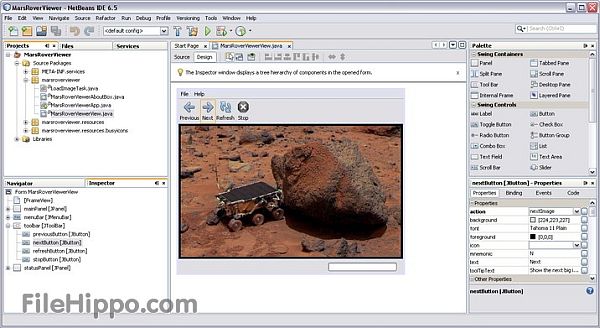
With a very well-organized GUI, this utility has its functions very easily accessible and carefully grouped so users can actually save time and avoid going through many tabs, and menus just to find one simple feature.
Since it is written in the Java programming language, NetBeans IDE will have a serious impact on system resources when running, yet other than that, there should be no other major drawbacks that users will encounter.
Supported programming languages
Mainly designed to create Java applications for desktop, mobile and web environments, this software is also suited for HTML5 development, as well as for PHP and C/C++ projects. Besides being a cross-platform IDE, NetBeans is also extensible through plugins and offers a wide variety of resources for those interested in programming.
Inside that package, there are dedicated editors not only for Java and JavaScript, but also for Groovy, HTML and XML, to name just a few.
Debug your script, enable code completion and formatting
Finding issued in the code is not difficult task thanks to the built-in NetBeans Debugger which coupled with FindBugs will be of great help.
Collaboration and repository management are supported by NetBeans IDE and the customization possibilities offered by this software are quite extensive. From formatting and code completion, up to issue tracking and versioning systems users can choose the most appropriate settings for the projects they work on and adapt everything to the available hardware resources.
Conclusion
All in all, it is safe to say that especially when it comes to the Java application development, regardless of the target platform, NetBeans IDE is the safest bet. Intuitive and complex in the same time, this software comes with everything one would need to get the job done bug-free and at the highest quality standards of these days.
Supported technologies
• Java EE 7, Java EE 6, and Java EE 5
• JavaFX 2.2.x and 8
• Java ME SDK 8.0
• Java Card 3 SDK
• Struts 1.3.10
• Spring 4.0.1, 3.2.7, 2.5
• Hibernate 4.2.6, 3.6.10
• Issue Tracking
- Bugzilla 4.4 and earlier
- Jira 3.13+ and 5.0+
• Node.js 0.12.x
• PHP 5.6, 5.5, 5.4, 5.3, 5.2, 5.1
• Groovy 2.1
• Grails 2.3, 2.2
• Apache Ant 1.9.4
• Apache Maven 3.0.5 and earlier
• C/C++/Fortran
• VCS
- Subversion: 1.8, 1.7, 1.6
- Mercurial: 2.8.x and later
- Git 1.8.х and later
FEATURES
JDK 7
Project Coin support
Editor enhancements: Code completion, hints
WebLogic Server
Streamlined and faster deployment to WebLogic
New server runtime node displaying deployed applications and resources
JSF integration with server libraries
Oracle Database
Simplified connection wizard
Guided installation to JDBC driver
Editing and deployment of stored procedures
GlassFish
GlassFish 3.1 support
Domain restart and log viewer for remote GlassFish
Enable and disable deployed applications
Java
Maven 3 support
JUnit 4.8.2 integration and various JUnit improvements
Remote HTTP URLs supported for Javadoc in libraries and Java platforms
New improved visual customizer for GridBagLayout
Java EE
Improved support for CDI, REST services and Java Persistence
New support for Bean Validation
Support for JSF component libraries, including bundled PrimeFaces library
Improved editing for Expression Language in JSF, including code completion, refactoring and hints
Web Languages
HTML5 editing support
JSON formatter
PHP
Generate PhpDoc
Rename refactoring, Safe Delete Refactoring
PHP 5.3 - Support for aliases
C/C++
Easy import of project from user's existing binary
New Project type where user's source files are located on remote system
NetBeans Platform
Annotations for generating Action registrations in the layer
Performance enhancements & tight integration with Profiler
Additional NetBeans API changes
General
Word wrap in Editor
Enhanced Profiler integration
Less intrusive checking for external changes when switching between the IDE and other programs.
New in version 8.1 (November 5, 2015)
• Node.js support
• HTML5/JavaScript Enhancements
• Java Enhancements
• PHP Enhancements
• C/C++ Enhacements
• Support for remote Oracle WebLogic Server
• Community contributed WildFly 9 and 10
• Bundling with the JAVA JRE
SYSTEM REQUIREMENTS
• Minimum Hardware Configurations
• Processor: 800MHz Intel Pentium III or equivalent
• Memory: 512 MB
• Disk space: 750 MB of free disk space
• Recommended Hardware Configurations
• Processor: 2.6 GHz Intel Pentium IV or equivalent
• Memory: 2 GB
• Disk space: 1 GB of free disk space
• JDK (JAVA DEVELOPMENT KIT)
JDK 7 and later versions are required for installing and running the NetBeans IDE 8.1 All. You can download standalone Java SE Development Kit 8 update 66.
OS: Windows Vista / Vista 64-bit / 7 / 7 64-bit / 8 / 8 64-bit
Download
Uploaded - NetBeans IDE 8.1 All Final
Uploaded - Java SE Development Kit 8 update 66 (x86)
Uploaded - Java SE Development Kit 8 update 66 (x64)
Mirror
Rapidgator - NetBeans IDE 8.1 All Final
Rapidgator - Java SE Development Kit 8 update 66 (x86)
Rapidgator - Java SE Development Kit 8 update 66 (x64)
Mirror
Turbobit - NetBeans IDE 8.1 All Final
Turbobit - Java SE Development Kit 8 update 66 (x86)
Turbobit - Java SE Development Kit 8 update 66 (x64)
---
__ __ __ __ __ __ __ __ __