Windows Firewall Notifier 2.0.6146 portable
This post was published 9 years ago. Download links are most likely obsolete. If that's the case, try asking the uploader to re-upload.
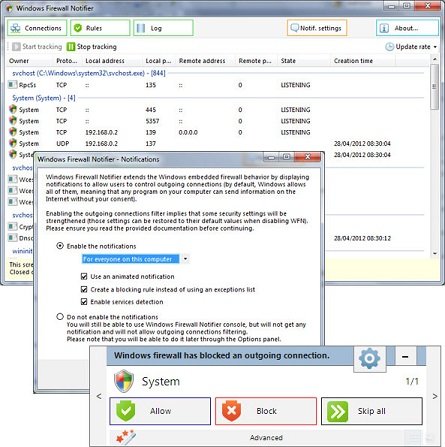
Windows Firewall Notifier 2.0.6146 portable | 19 Mb
As its name implies, Windows Firewall Notifier (shortly known as WFN) will track all the active processes and services and notifies you each time an application wants to connect to your computer. On this manner, you can easily safeguard your PC, as well as your personal documents against viruses, malware, spam and other threats lurking the Internet.
Being designed mostly to extend the functionality of the default Windows embedded Firewall, the application is aimed at fully-customize the way of managing the rules and tracking all the processes that are connected to your computer. As you might know, each time a process or service is detected, the Firewall prompts you with a small notification window from where you can allow or block the access to your files.
By default, the Windows operating system does not block any of the outgoing connections, meaning that your entire computer is exposed to threats and that any program you have installed on your PC (especially those apps downloaded from untrusted websites) can send information to unauthorized sources without your consent.
When you launch the program for the first time, you can enable the notifications, as well as create a blocking rule in order to strengthen some security settings. Additionally, Windows Firewall Notifier blocks all the apps even if you disable WFN notifications.
The main window displays all of the available processes and active connections along with some basic information such as ‘Protocol’, ‘Local address’, ‘Local port’ and ‘Creation Time’. Also, the closed connections (marked with the orange color) will be displayed in the main window for a few seconds before disappearing.
By accessing the Rules section, you can preview all the available Windows Firewall rules, as well as manually create new ones or remove them if required.
To conclude, Windows Firewall Notifier comes in handy for users who need to monitor all the outgoing connections and available services, as well as view real-time information regarding the Firewall rules.
Whats New
Services selection window now working. If multiple services are detected, you can now select to which services to apply the rule!
Small improvements to service detection code. It should now be even more reliable in detecting services.
Improved selected port filter on rules. Don't select local port checkbox or protocol checkbox by default when they don't make sense.
Enable long path support. WFN will now handle long paths properly.
Fixed a couple of cases where the notifier would not pop up. Fixed a couple of crashes, race conditions, and other bugs related to the notifier popping up.
Slightly reduced memory usage of WFN.exe.
HomePage