Krita 3.1.3 (x86/x64) Multilingual Portable
This post was published 9 years ago. Download links are most likely obsolete. If that's the case, try asking the uploader to re-upload.
File size: 80.1 MB
Krita is a FREE and open source painting tool designed for concept artists, illustrators, matte and texture artists, and the VFX industry. Krita has been in development for over 10 years and has had an explosion in growth recently. It offers many common and innovative features to help the amateur and professional alike.
User Interface
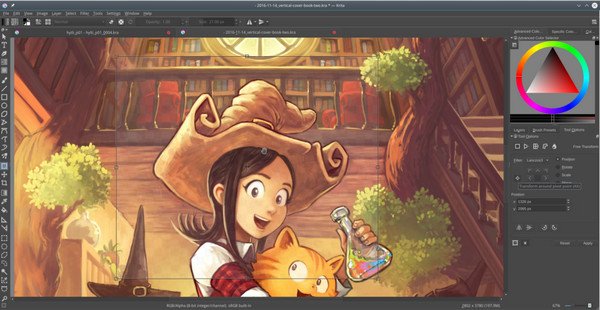
An intuitive user interface that stays out of your way. The dockers and panels can be moved and customized for your specific workflow. Once you have your setup, you can save it as your own workspace. You can also create your own shortcuts for commonly used tools.
Brush Stabilizers
Have a shaky hand? Add a stabilizer to your brush to smoothen it out. Krita includes 3 different ways to smooth and stabilize your brush strokes. There is even a dedicated Dynamic Brush tool where you can add drag and mass.
Pop-up Palette
Quickly pick your color and brush by right-clicking on the canvas. You can also use Krita’s tagging system to swap out the available brushes that are displayed. The ring outside of the color selector contains the most recently used colors. These settings can be configured through the preferences.
Brush Engines
Customize your brushes with over 9 unique brush engines. Each engine has a large amount of settings to customize your brush. Each brush engine is made to satisfy a specific need such as the Color Smudge engine, Shape engine, Particle engine, and even a filter engine. Once you are done creating your brushes, you can save them and organize them with Krita’s unique tagging system.
Wrap-around mode
It is easy to create seamless textures and patterns now. Press the ‘W’ key while painting to toggle wrap-around mode. The image will make references of itself along the x and y axis. Continue painting and watch all of the references update instantly. No more clunky offsetting to see how your image repeats itself.
Resource Manager
Import brush and texture packs from other artists to expand your tool set. If you create some brushes that you love, share them with the world by creating your own bundles. Check out the brush packs that are available in the Resource area.
Release Notes
New Features:
implement context menu actions for default tool (cut, copy, paste, object ordering)
added option to allow multiple instances of krita (BUG 377199)
scale around pivot point added
Changes/Fixes:
Fix eraser switching back to the brush after flipping the stylus (BUG 375878)
Fix the OpenGL crash detection and show Intel warning earlier
Fix the High DPI switch
Improve how you select brush spacing so it is easier to slide to a value
Fix right-button popup menus in tools when using Tablet Stylus (BUG 344878)
Added layer thumbnail on the animation timeline while hovering
Improvements to undo and the swap operation save memory
Fix when sometimes layer says “group not editable” (BUG 376214)
Fix slow down when changing of the smoothing options (BUG 375882)
Fix crash when closing an image right during the transformation operation
Fix a crash when switching tools while running the color picker (BUG 373883)
Update to Spriter plugin
Fix resetting the paint device cache (BUG 374142)
Upgrade the layer to an animated one when the first frame is added (BUG 377176)
Warn the artist when saving a read-only file (BUG 376098)
All file layers to be merged (BUG376613)
Add user feedback when locking for drag and drop between images (BUG 376382)
Fix potential crash when dragging and dragging large layers between images (BUG 376382)
Don’t crash if there is no proofing color space (BUG 376311)
Fix a crash when the layer gets changed to quickly during moving animation (BUG 377614)
Fix loading of some animation files
Port animation frames to use strokes (BUG 37696)
Update calligraphy tool icon
Fix removing color labels from multiple frames (BUG 374746)
Add a warning dialog when a person is potentially saving a corrupted image (BUG 361883 BUG 378681)
Fix updates to assistants when the brush outline is disabled (BUG 377952)
Fix for loading the display settings
Fixed a potential crash when merging layers with pass-through mode
Fixed flattening and merging of pass-through lode layers
Fix crash when double clicking on a polyline object (BUG 376497)
Fix frame offset when dragging and dropping between layers
Updated default settings for liquify tool (thanks David Revoy)
Fix issues with saving layer styles and vector layers.
Fix rending a sequence of one animation frame
Show the on-canvas message by default since mirror view needs it (BUG 346014)
Fix for converting floating point channel depth to 8 bit integers with PNG format (BUG 375217)
Fix crash when a file layer is deleted (BUG 376993)
Make lens blur work when using Krita in another language than English (BUG 376262)
Fix memory leak in PNG converter (BUG 378134)
Update tooltips for play and stop in animation docker
Convert the pasted clip color space when the option is set (T5367)
Fixes for loading ORA file types
Fix for updating title of document when changing document title (BUG 374389)
Fix activating next/previous layer shortcut for layer groups which are invisible
New icon for transform from pivot point
Show layer color labels in timeline docker
Use the name of the filter when creating a filter mask from the filter dialog instead of “effect”
Don’t cover startup dialogs (for instance, for the pdf import filter) with the splash screen
Fix a race condition that made the a transform mask with a liquify transformation unreliable
Fix canvas blackouts when using the liquify tool at a high zoom level
Fix loading the playback cache
fix with dragging when shift is selected (BUG 373067)
Use the native color selector on OSX: Krita’s custom color selector cannot pick screen colors on OSX
Set the default PNG compression to 3 instead of 9: this makes saving png’s much faster and the resulting size is the same.
Fix a crash when pressing the V shortcut to draw straight lines
Fix a warning when the installation is incomplete that still mentioned Calligra
Make dragging the guides with a tablet work correctly
Pressing and releasing a modifier key now updates the cursor instantly
Homepage
Quick check before we show the links
Helps us keep automated scrapers from hammering the filehosts.